DMS for Sharepoint - Product Overview

Look

  • DMS User Interface
  • Subscriptions

Store

  • Email Management
  • Importing Content
  • Records Management

Search

Share

  • Document Compare
  • Portability
  • The Cloud

Specs

  • Security
  • Technical Information
  • Office 2010 Integration
  • Add-In compatibilty

PDF Downloads

DMS User Interface

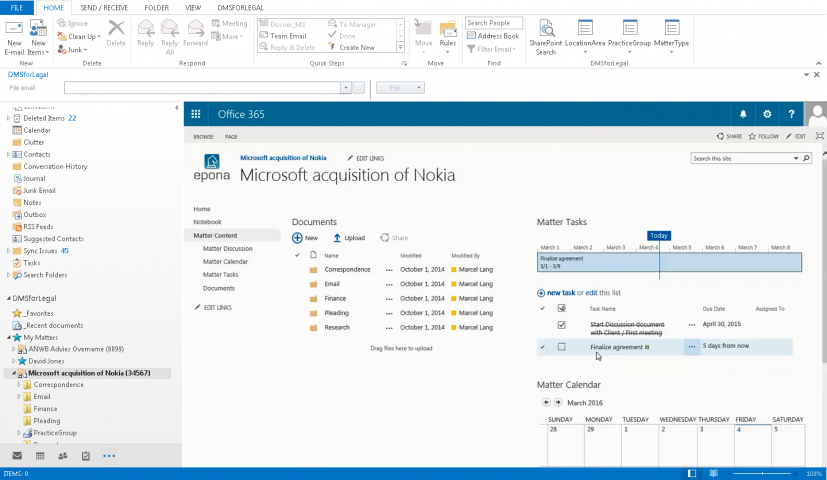
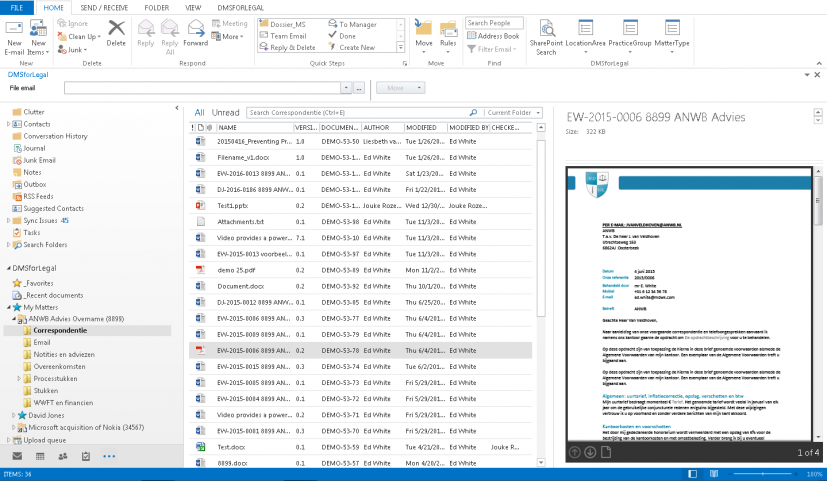
DMS for Sharepoint utilizes Outlook 2010 as the primary interface for document/content access. A tree is added to the Outlook tree which is the SharePoint DMS for Sharepoint tree. Through the use of this tree, users can save (by search, browse, and drag & drop) content to the SharePoint server, as well as access content that is already stored within the server.

Subscriptions

DMS for Sharepoint gives users complete control over what content folders (matters/engagements) that users can view immediately in the Outlook Tree. Users can also subscribe to other users “subscriptions” thus providing support staff with an organized means of accessing content by whom they support. Additionally, if users have clients/customers with multiple matters/engagements, they can view their content by the client thus enabling the multiple matters to be viewed for that client. Content is subscribed to by simply right clicking within Outlook and selecting by browsing or searching for the desired content. DMS for Sharepoint also makes auto-subscriptions easy for IT by allowing for accounting/matter-in-take code definitions to assign content to specified users. Unsubscribing is simply a matter of right clicking and ‘unsubscribing’.

E-Mail Management

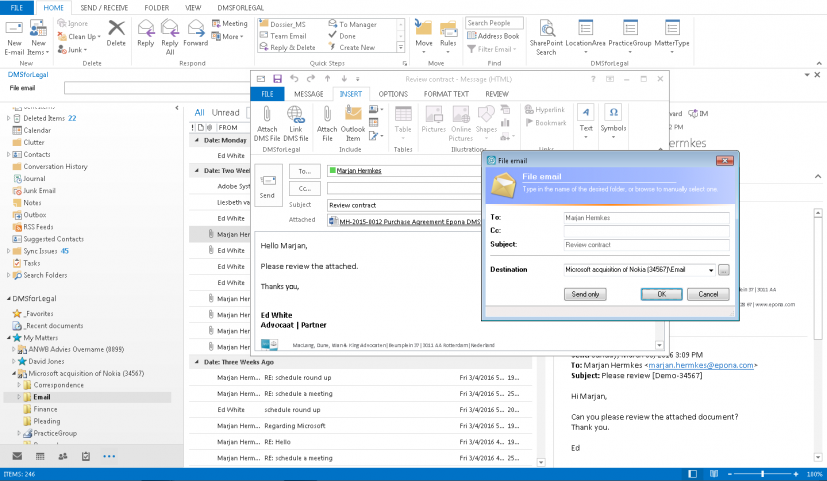
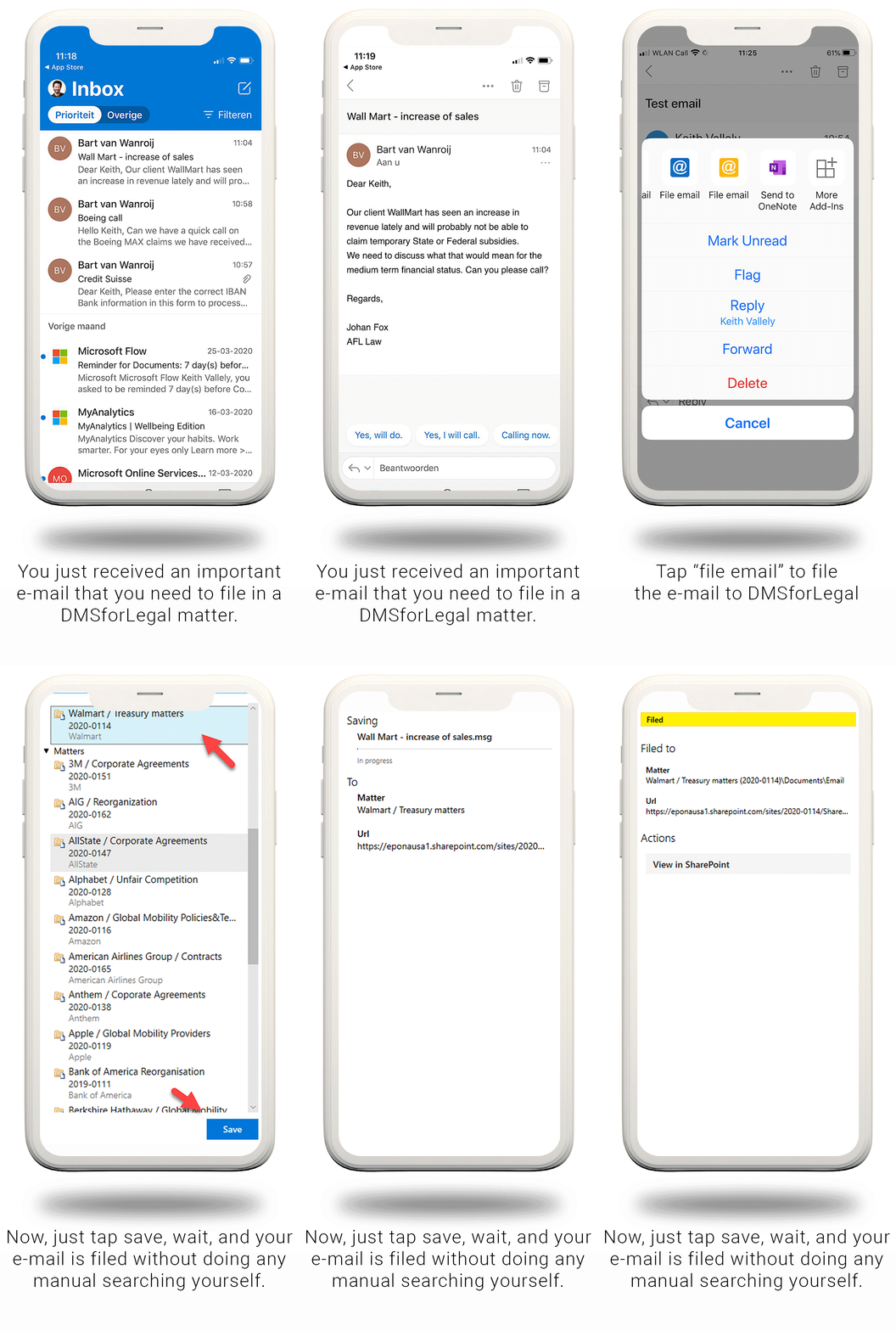
DMS for Sharepoint gives users the means to easily, and naturally manage their e-mail. All e-mail, including attachments, can be saved directly into SharePoint by dragging & dropping the content directly into the desired location through use of the Outlook 2010 – DMS for Sharepoint tree. E-mail can also be copied, moved, or saved into SharePoint locations using the right click functionality of Outlook. Automatic e-mail filing is easily utilized by a ‘send-and-file’ methodology, wherein the user selects the location to save the outbound e-mail when sending. As the e-mail is sent, a luggage tag is added to the e-mail, which will then automatically file the reply to the originating email in the same location. When adding the SharePoint Enterprise Content Management capabilities, e-mail content can then be archived, stored, and managed within SharePoint. Users also have the additional means of sorting the content stored within SharePoint by the Outlook column headers.


Importing Content

DMS for Sharepoint sits atop the SharePoint Platform. When looking to put content into SharePoint while using DMS for Sharepoint, there are a number of easy ways to do that including drag & drop, search and browse during a save function in an Office 2010 application. However, if you are planning to move large quantities of documents into SharePoint from either a networked storage location or from a legacy document management system, we have tools to assist. Epona USA has developed an import utility that easily import large amounts of data from a networked location, or CD/DVD drive, which can be provided to users or used administratively. For imports coming from a legacy database, we have developed utilities that will map metadata fields in the legacy system to SharePoint metadata fields and then import the content you want to bring over from your historical document management system.

Records Management

Records Management in SharePoint is incredibly powerful, and fully integrated. DMS for Sharepoint supports all aspects of the SharePoint ECM module and requires no additional add-ins or software purchases. Records management in SharePoint 2010 has full capabilities for archiving, multi-stage document retention, Per-item audit reports, Hierarchical file plans, taxonomy and centralized content types and more. What is even more impressive, is the ability to make blogs, wikis, and websites part of a recorded item. If you want to learn more about SharePoint ECM, click this link. The link will take you to another website.

Search for Content in Outlook

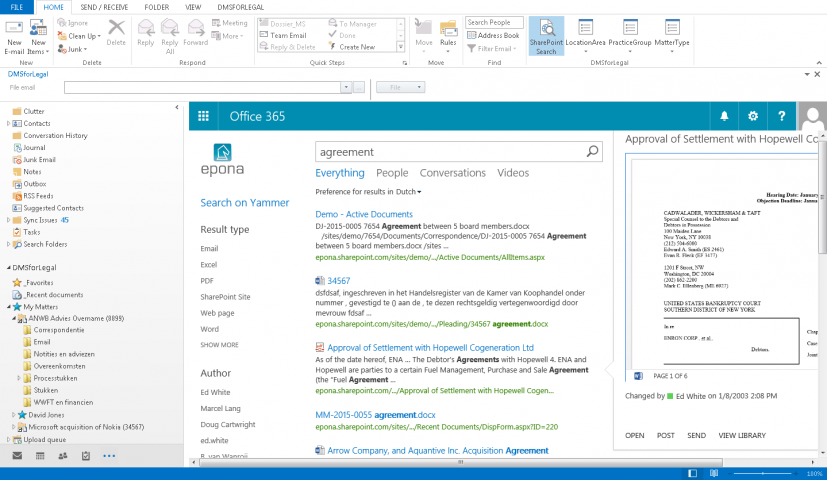
DMS for Sharepoint provides full SharePoint database search capability by giving users the means to search across all SharePoint databases from within the Outlook Search bar. Using the Outlook Search bar, users can search by document content, or any of the metadata fields or document properties assigned to the content within the SharePoint database. Advanced search capabilities are also available from within Outlook 2010. Additionally, searching for specific content from within any Office 2010 Application is native and easy as well, allowing for both search and browse capability.


Document Compare

DMS for Sharepoint is seamlessly integrated with Office 2010, thus allowing for full functionality of Word 2010 document comparison, and version control. Documents stored within SharePoint can be accessed through MS Word by browsing or searching. If a user desires to utilize the document comparison features of Word 2010, they simply access any desired document (whether in SharePoint or locally stored) and proceed to work. During the saving process, the user may then save any of the changed, compared, or merged documents into SharePoint, or locally, by browsing or searching for the desired location. DMS for Sharepoint also supports both Major and Minor version control during the saving process, making it easy to save multiple versions of documents either within SharePoint or locally.

Portability

DMS for Sharepoint fully supports SharePoint Workspace 2010. SharePoint WorkSpace 2010 provides a client for the SharePoint 2010 server that enables real-time synchronization of desktop/laptop content with your line-of-business organizational structure within SharePoint. Now your legal, accounting, or manufacturing professional can take the “matter” in SharePoint on the road with their laptop. Any changes that are made to the content will automatically be synchronized upon reconnection to the SharePoint server. To more clearly understand the features and benefits of SharePoint WorkSpace 2010 click this link.

The Cloud

With DMS for Sharepoint, all of your content that is stored on the SharePoint server, with its entire organizational structure can be accessed and stored in The Cloud, utilizing the Microsoft Office 365 capabilities for SharePoint Online. Once again, using DMS for Sharepoint means you will NOT have compatibility or integration issues with SharePoint Online. To learn more about SharePoint Online, click this link.

Security

Security and content access is easily defined within DMS for Sharepoint through the utilization of the SharePoint security features. Users, Groups, and Roles can all be defined within SharePoint and set automatically upon client/matter/engagement creation, and is fully utilized by DMS for Sharepoint. Moreover, users themselves can set security on stored content, at any level within the line-of-business SharePoint structure if desired. DMS for Sharepoint supports the SharePoint security model by disallowing users who do not have the proper authorizations, from any prohibited activity.

Technical Information

DMS for Sharepoint has two components. A server side application and a client side application. DMS for Sharepoint does not implement a middle or third tier server. All connections between SharePoint and Microsoft Office Applications are direct. DMS for Sharepoint also utilizes a queue system to manage the transfer of documents from the client side to the server. This queue process ensures that documents moved from the client side actually make it to the server. An additional benefit to using this methodology is that Outlook and other Office Applications will not slow down, or require a waiting time for content to move to the server. Also, the queue is ideal for situations where network connectivity is slower or intermittent.

DMS for Sharepoint system requirements are: Microsoft SharePoint Server 2010 or Microsoft SharePoint Foundation 2010 and Microsoft Office 2010.

Office 2010 Integration

DMS for Sharepoint unifies SharePoint 2010 and Office 2010 in a way that is easy to work with, and instantaneously useable. From within any Office 2010 application, a user can access content that is stored in SharePoint. All native right-click functionality within Office 2010 applications is maintained and fully functional, making simple tasks like moving content from a locally stored location to a SharePoint location easy. DMS for Sharepoint is full MAPI integration with Outlook also enhances speed, removes the Outlook freeze up and crash that is common with nearly all COM-add in’s for Outlook, and also prevents other Outlook Add-ins from breaking. DMS for Sharepoint also is directly connects Office 2010 to SharePoint 2010 without the presence of a middle-tier server, which simplifies upgrades, removes the need for “dashboards” and enhances speed and other performance challenges.

Add-In Compatibility

DMS for Sharepoint does not change Office 2010 in any way. DMS for Sharepoint does not change SharePoint 2010 in any way. This is a welcome relief for Technology Professionals who are responsible for maintaining the myriad of data systems (and data silos) that integrate, interact, and rely on Microsoft Office Applications. What this means in simple terms is that if you have a line-of-business mission critical application, add-in, or utility, you no longer have to wait for ‘all parties’ to get up-to-date to upgrade your productivity tools and software. With DMS for Sharepoint, all secondary and tertiary products only need integrate with SharePoint 2010. There is no requirement for any software product to integrate with DMS for Sharepoint. If your mission critical software integrates with SharePoint 2010 - it integrates with DMS for Sharepoint.